Sign up for the new Regal Marketplace website

Hello All,
We are excited to announce the launch of the Regal Marketplace, a private digital space created specifically for our employees. Whether you are looking to post items for free, organize a garage sale, share upcoming local events, or post miscellaneous news, this is your new go-to platform.

What is the Regal Marketplace? It is a secure, internal-only site designed to help us stay connected. To ensure the platform remains professional, safe, and 100% spam-free, we have implemented an invite-only approval process.

How to Join:
- Sign Up: Visit the registration page: https://regallakeland.github.io/Regal-Marketplace
- Create Your Account: Fill out the registration form with your chosen username.

- Agree to Rules: You will need to review and agree to the community rules before accessing the website.
- Wait for Admin Approval: Once you submit, your account is sent for review. I will be personally approving each request to ensure only verified team members have access.
- Log In: As soon as your account is approved, you will be cleared to log in and start posting!
Support & Questions: If you run into any issues during the sign-up or approval process, please reach out to our site administrators:
- Janni Rivera: janni.r@regallakeland.com
- Michael Hall: michael.h@regallakeland.com (Honda Service Advisor)
Our goal is to provide a helpful tool for everyone at Regal to share and find what they need within our own community.
See you on the Marketplace!
THANK YOU MICHAEL HALL FOR DEVELOPING THIS WEBSITE FOR OUR EMPLOYEES!!
Are you getting emails from COMPLY AUTO?
If you are getting these emails, then YES it is ok to click and complete the training course. This is mandatory for ALL employees for keeping our computers and our customers information safe.
Just a snapshot of information you will learn about:
ELECTRONIC SAFEGUARDS

This is a sample of what your email will look like:

Protect your Email!
| Think about what lives in yours. |
| Bank statements. Doctor results. Your retirement account, your mortgage company, every streaming service, every store you’ve ever bought anything from. And every single password reset link on the planet lands right there. |
| A criminal doesn’t need to hack your bank. They just need your inbox. One account. Every other door swings wide open. That’s not a flaw. That’s how email was designed to work. And most people protect it with the same password they’ve used for years and years. |
| Nope. Not anymore. |
| 🔑 Here’s how fast it happens |
| Hackers go to your bank’s website. Click “Forgot Password.” Type your email. The bank sends a reset link straight to your inbox. The criminal, already inside, clicks it, creates a new password and walks right in. Then they do it to your Amazon. Your PayPal. Your brokerage. Each one takes about 60 seconds. It’s less effort than ordering a pizza. |
| The FBI calls this account takeover fraud. And 81% of victims said they thought they were “pretty careful” about security beforehand. |
| 1. Get a real password. Under 16 characters or reused anywhere? Change it today!! |
| 2. Turn on two-factor authentication. But not the text version. SMS codes can be hijacked through SIM swap attacks, where a criminal calls your carrier, sweet-talks a rep and transfers your number to their phone. It’s terrifyingly easy. Use Google Authenticator instead. |
| 3. Audit every app connected to your inbox. Every “Sign in with Google” click handed that app a key to your email. Some read your messages. Some send emails as you. Do it now: myaccount.google.com > Security > Third-party apps with account access. |


| Your bank has a fraud department. Your credit card has zero-liability protection. Nobody is covering your email. That one is entirely on you. |

Burger in a Bowl
Pray Like This…
Prayer is simply an honest, ongoing conversation with God.
Jesus tells us that God knows what we need (Matthew 6:8), but He still wants us to come and tell Him what’s on our minds. He’s a good Father who cares for us (Matthew 7:11). He wants to speak into our circumstances, comfort our hearts, and shape our perspectives.
He loves giving good gifts to His children—gifts they want, long for, and ask for. But sometimes, what we want isn’t actually good for us.
When Jesus says in Matthew 7:8, “Ask, and it will be given to you,” He isn’t saying that we will get everything we ask for…
God cannot—and will not—give us anything that contradicts His character. God will only give us what is good, and sometimes a “no” from God is the response we actually need. But He still wants us to bring Him all our desires, and if we ask for anything that aligns with His will, He hears us. (1 John 5:14)
So how do we discover God’s will?
We spend time with Him.
The more we get to know God, the more we will understand His character. And it’s only when we understand His character that we will ask for things that align with His will.
Jesus’ words in Matthew 7 are a promise that when we ask for God, He gives us Himself. When we humbly seek God, He finds us. And when we come to Him as we are, He welcomes us with open arms.
When we draw near to God, He will draw near to us. And when He draws near, He transforms the way we think, renews our minds, restores our souls, and leads us down paths that are for our good and His glory.
Phone Myths

| 🦄 The myths that got all of us |
| Closing background apps saves battery. Nope. Completely backward. Apple confirmed it directly: Force-closing apps and reopening them uses more battery than leaving them alone. Your phone manages its own memory just fine. You swiping everything away actually works against it. Put the phone down. |
| Incognito mode makes you private. I want to grab people by the shoulders on this one. Incognito only hides your history from other people on your device. That’s it. Your internet provider still sees every site you visit. Websites still log your IP address. Google knows it’s you. Incognito is a privacy curtain inside your own house. It does nothing about the people outside. |
| Deleting a photo means it’s gone. It isn’t. On iPhone, deleted photos sit in your Recently Deleted album for 30 days, fully visible to anyone who picks up your phone. On Android, same story. And if you have iCloud or Google Photos backup turned on? You have to delete them in at least three separate places to get anywhere close to actually gone. People have discovered this the hard way during breakups, job interviews and phone repairs. |
| 🔋 The one quietly killing your battery tonight |
| Charging to 100% every night feels responsible. It isn’t. Lithium batteries degrade fastest at the extremes. Apple, Samsung and Google all recommend keeping your charge between 20% and 80%. |
| On Android: Go to Settings > Battery > Charging Optimization. On iPhone: Settings > Battery > Charging. Turn on optimized charging right now. Your battery will last years longer. |
That “unsubscribe” button isn’t helping you. It’s confirming you’re real. Every time you click it, you’re telling spammers your address is live, and someone reads it.
Protect yourself from Scams!!
What’s the single most important thing you can do to keep crooks from getting your personal information?”
The most important thing you can do is to stop clicking links in emails and texts. Most scams succeed because they trick us into clicking something that looks urgent and giving away our passwords and credit card numbers. If you go directly to websites and apps to check instead of clicking on the link in the email or text, you shut down the biggest way crooks steal personal information.
You downloaded a flashlight app. A game. A weather widget. Something useful, free and completely harmless-looking.
But “free app” and “surveillance tool with a useful feature stapled on top” are often the same thing. The app works. It also happens to be reporting your location, your contacts and your browsing habits to companies you’ve never heard of.
The scariest thing isn’t hiding under your bed. It’s on your phone.
📍 Delete these first
1. Third-party flashlight apps. The FTC went after one popular flashlight app after it quietly sent users’ precise GPS coordinates to advertisers. Your phone has a built-in flashlight.
2. Free QR scanner apps. Your phone’s camera scans QR codes. Many third-party apps exist for one reason: ads and data collection. You don’t need them.
3. Third-party weather apps. The Weather Channel app settled a lawsuit over selling location data to advertisers. Your phone’s built-in weather app works fine.
4. Free VPN apps. You download a VPN to protect your privacy, and it turns around and sells your browsing history. Pay for ExpressVPN.*
5. AI photo apps. That fun app that makes you look younger asked for full access to your camera roll. And in some cases, your facial biometric data.
🔓 The ones you forgot about
6. Life360. Sold to parents as a family safety app. Sold to data brokers as a precise location feed, including your kids’ locations. Go to Settings > Privacy & Security > Location Services > Life360 and set it to While Using.
7. Truecaller. Truecaller builds its database by uploading the entire contact list of every person who installs the app. If your friend has it, your name and number are in the database.
8. Words With Friends. A breach exposed data of over 200 million accounts. Names, emails, login credentials, phone numbers. If you play, use a throwaway email.
9. Flo Health. The popular fertility app settled with the FTC after sharing users’ reproductive health data with Facebook and Google. Deeply private information. Go to Settings > Privacy Mode inside the app and enable Anonymous Mode. Or switch to Apple Health’s on-device tracking, which never leaves your phone.
10. Facebook. If you granted “Always” location access, Facebook tracks your movements even when the app is closed. Go to Settings > Privacy & Security > Location Services > Facebook and change it to While Using or Never. I’ll wait.
11. TikTok. Researchers caught TikTok reading iPhone users’ clipboard data every few seconds. That means passwords, banking confirmations, medical notes. Anything you copied, TikTok potentially saw. The company says it fixed it. Check anyway: Settings > Privacy > Clipboard on your iPhone to see which apps have recently accessed it.
12. DoorDash. A breach hit nearly 5 million customers, drivers and merchants. Driver’s license numbers, bank account info, all of it. Go to Settings > Account > Privacy in the app and kill every marketing permission. You ordered a burrito. Not a data relationship.
13. Any app you haven’t opened in 30 days. Open your phone and scroll. Count the ones collecting dust. Those are your starting point. Delete them. If you genuinely miss one, re-download it. You won’t miss any of them.
Use AI as your doctor’s appointment copilot
| Studies show that 40% to 80% of medical information given during appointments is forgotten by the time patients get home. And follow-up visits cost $250 to $350 on average. A lot of those visits are needed because someone didn’t understand their instructions or left without asking the one question that mattered. |
| Here’s your fix. Before your next appointment, open ChatGPT, Claude, Gemini or Grok and paste this: |
Think of an upcoming appointment, even a dental cleaning or a specialist visit. Paste the prep prompt below with your details into your AI of choice
| “Be my patient advocate. I have a doctor’s appointment on [date] for [reason]. My main symptoms are [list them]. I’ve been on [medications] for [conditions]. I’m [age] years old. Build me a one-page appointment prep document that includes: my top 5 questions ranked by priority, a symptom timeline, what tests or referrals I should ask about and the one question most patients forget to ask their doctor about this condition.” |
Print the Document or pull it up on your phone while in the waiting room and then after the appointment, paste your notes or lab results and ask AI:
| Explain what these results mean in plain English. What should I be watching for? What follow-up questions should I ask at my next visit? |
| You’re not replacing your doctor. You’re showing up like someone who respects both their time and yours. Big difference. |
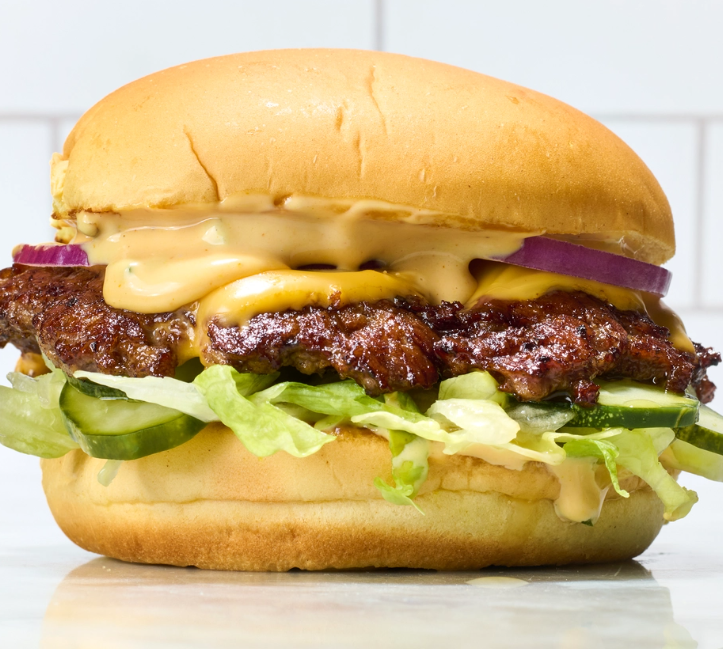
Oklahoma’s Onion Burger
Makes 1 burger
- 1/3 pound ground chuck (80/20)
- 1 small yellow onion, thinly sliced
- Tallow, lard, butter or plant-based fat for frying onions
- Salt and pepper to taste
- 1 toasted hamburger bun
- Condiments as desired, but definitely pickles
Heat a stainless-steel or cast-iron grill or a large cast-iron pan to medium-high. Place the onions in a tangled pile on one side of the grill, and add a couple tablespoons of water to steam them up a bit. Then add about a tablespoon of tallow or another fat to them and leave them to sauté while you prepare the burger.
Roll the burger into a ball, then with a piece of parchment paper over it, use a burger press or a stiff metal spatula to smash the burger to about a quarter-inch thickness. Season it with salt and pepper.
Put the two halves of the bun on the grill or a separate pan to toast them.
When the onions have caramelized a bit, scoop them onto the burger patty and press them firmly into the meat. When the burger has developed a crust on the grill side, flip the onion side down and allow it to brown a bit. If adding cheese, this is the moment to do so.